
UPS Battery Backup for Home Offices: What It Protects and What It Doesn’t
A UPS, or uninterruptible power supply, is one of the simplest ways to make a home office more resilient to short power interruptions. It can keep selected equipment running long enough to save work, finish a call, or shut systems down properly instead of losing power instantly. Depending on the model, it can also help with some power fluctuations.
What a UPS cannot do is turn a home office into a fully independent power system. Battery capacity is limited, runtime depends heavily on what is connected, and large devices can drain it quickly. The useful way to think about a UPS is as a short-term bridge between normal power and whatever comes next.
What a UPS Actually Does
A UPS sits between selected equipment and the wall outlet, passing utility power through while maintaining its internal battery. If incoming power fails, the battery-backed outlets switch to stored power quickly enough that computers, networking equipment, and many other electronics can continue running. The battery then supplies power until utility service returns, the equipment is shut down, or the available runtime is exhausted. Some models can also communicate with a computer and trigger an automatic shutdown if the outage continues.
This makes a UPS useful for brief outages, flickers, and momentary electrical interruptions that would otherwise shut equipment down abruptly. The user gains time to continue briefly or shut down in a controlled way. Exact protection varies by UPS type and model, so manufacturer specifications still matter.
A UPS Is Most Valuable During Short Outages
Many household power interruptions are brief enough that a modest UPS can make them almost invisible to a home-office user. The lights may flicker or go out for a minute while the computer, primary monitor, modem, and router continue operating. If power returns quickly, work may continue without restarting equipment.
Longer outages require a different mindset because a UPS is normally intended to bridge an interruption, not run an office indefinitely. Runtime may range from a few minutes to much longer depending on battery size and electrical load. This is why buying based only on maximum wattage can be misleading. Manufacturer runtime charts at realistic loads are usually more useful than the largest number printed on the box.
Computers Are an Obvious Priority
A desktop computer can lose power instantly when electricity fails. Unsaved work can disappear, applications may close improperly, and an unexpected shutdown can occasionally contribute to file or system problems. A UPS gives the user time to save work and shut the machine down normally.
Laptops already contain their own batteries, but a laptop-based office can still benefit from a UPS. The external monitor, docking station, network equipment, storage devices, and other parts of the workstation can shut down even while the laptop stays on. A UPS can therefore be useful with either type of computer. Desktop users often depend on it to keep the computer itself alive, while laptop users may use it mainly for surrounding equipment.

Your Internet Connection May Need Battery Power Too
A powered laptop is much less useful if the modem and router go dark. Home internet equipment normally depends on AC power even if the provider’s network is still operating. Keeping local networking equipment powered can allow calls, cloud applications, remote access, and messaging to continue during shorter outages.
A modem, router, and small network switch usually draw much less power than a desktop workstation. A UPS dedicated to networking equipment may therefore provide significantly longer runtime than one supporting a full computer setup. In some homes, separating network backup from workstation backup is a sensible design. Our guide to keeping home internet working during a power outage looks at the problem more broadly.
A Monitor Can Be Worth Backing Up
A desktop workstation normally needs at least one display during an outage. If every monitor shuts off, much of the available runtime becomes difficult to use. One primary monitor is therefore often sensible to place on battery-backed power.
Multiple displays can add substantially to the load. If the workstation normally uses two or three monitors, keeping only the primary screen powered can preserve usability without sacrificing as much runtime. Laptop users can often fall back to the built-in display, so keeping every external monitor alive may provide little benefit. The backup design should focus on the minimum equipment needed to keep working briefly or shut down safely.
External Storage Deserves Careful Consideration
External hard drives and network storage devices can be vulnerable to abrupt power loss while writing data. A UPS can give those devices time to complete current operations and shut down more cleanly, which can be especially useful when a NAS holds active business files or runs scheduled backups. Some storage devices can also use supported UPS shutdown features.
A UPS still does not replace data backup. It cannot protect files from accidental deletion, drive failure, malware, theft, or other causes of data loss. If the data matters, it should exist in more than one place. Our guide to what a small business should back up covers the broader data-protection side while the UPS addresses one specific source of interruption.
A UPS Can Help With Power Fluctuations
Many UPS units provide some degree of surge protection, and certain models also regulate voltage when incoming power is too high or too low. This can help equipment ride through less dramatic electrical problems without switching fully to battery every time. The behaviour depends on whether the unit is standby, line-interactive, or another design.
For many home offices, a line-interactive UPS is a common practical option for brief interruptions and some voltage variation. That does not mean every office automatically needs that design, since the connected equipment and local power conditions should guide the choice. A UPS should never be treated as a substitute for proper household electrical work. Repeated electrical problems, damaged outlets, overheating plugs, or suspected wiring faults belong with a qualified electrician.
What a UPS Does Not Protect Against
A UPS cannot prevent every type of power-related damage. A severe surge or direct lightning event can exceed the protection built into ordinary consumer equipment, and the UPS cannot keep systems running once its battery is depleted. It also does nothing to recover data from a failed drive or restore files deleted or encrypted by malware.
Its value comes from solving a narrower problem well. A UPS provides short-term power continuity and sometimes additional power conditioning. Broader resilience still requires data backups, account recovery, networking plans, and sensible equipment maintenance. Knowing those limits prevents the UPS from being expected to solve problems it was never designed to handle.
Printers Usually Do Not Belong on Battery-Backed Outlets
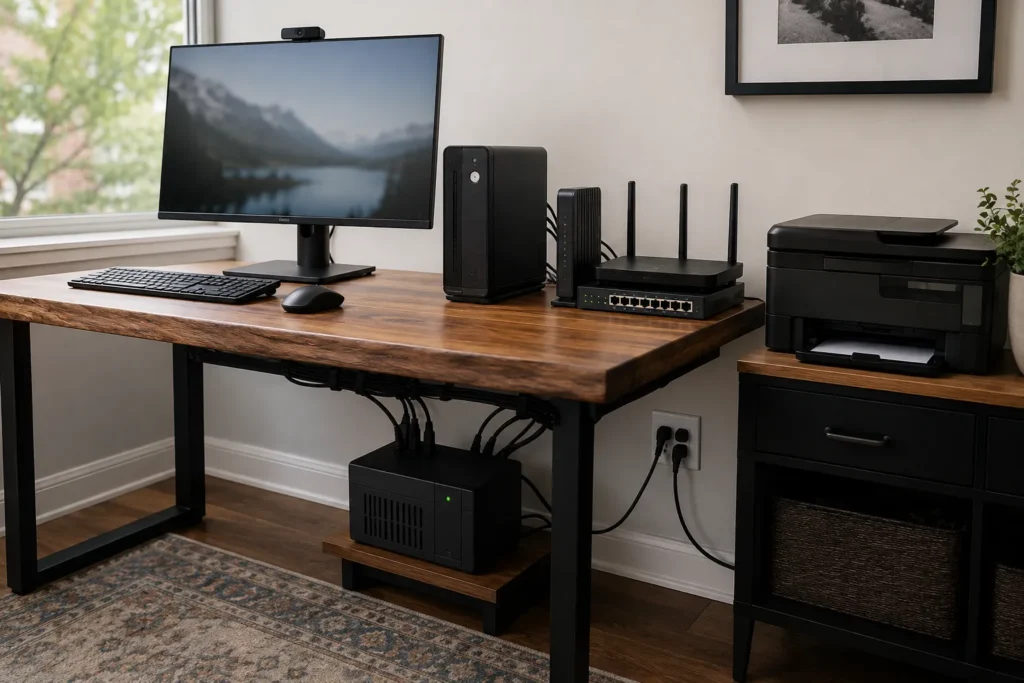
Laser printers can draw a large amount of power when heating the fuser. Connecting one to the battery side of a small UPS can overload the unit or reduce runtime dramatically, and many manufacturers specifically advise against it. The limited battery capacity is usually better reserved for computers, monitors, networking equipment, or storage.
Inkjet printers generally use less power, but keeping a printer operating during a short outage is rarely essential. Printing can usually wait until utility power returns. Some UPS units include surge-only outlets that may be suitable for non-critical devices when the manufacturer permits it. Those outlets provide no battery runtime, so follow the manufacturer’s guidance for high-draw equipment.
Heaters and Other High-Draw Devices Should Stay Off the UPS
Space heaters, kettles, coffee makers, portable air conditioners, and similar devices draw far more power than ordinary computing equipment. A home-office UPS is not intended to support these loads, and connecting them can overload the unit. The same caution applies to large motor-driven equipment and devices with high startup demand.
The UPS should be reserved for electronics within its rated output and supported device categories. A large number on the specification sheet does not make every household appliance an appropriate load. If larger equipment needs extended backup power, other power solutions may be required. Those are different tools and should not be confused with a conventional UPS.
Runtime Depends on the Load
A UPS that can support a workstation for twenty minutes at one load may last only a few minutes after additional equipment is connected. Batteries contain a finite amount of energy, so runtime falls as electrical demand rises. Connecting every device in the office usually works against the main purpose of the UPS.
Start by identifying the minimum equipment needed during a short outage. That might be a desktop, one monitor, modem, router, and a small storage device. Non-essential screens, speakers, printers, chargers, and other accessories can usually remain on ordinary power. A focused load often provides more useful runtime than trying to keep the entire workspace alive.
VA and Watts Both Matter
UPS products are commonly rated in volt-amperes, or VA, as well as watts. These figures describe related but different electrical limits, and a unit needs adequate capacity in both for the equipment connected to it. For ordinary home-office planning, those ratings can be used without detailed electrical calculations.
Check the power requirements of the main devices, estimate the realistic combined load, and compare it with the UPS manufacturer’s supported wattage and runtime information. Leave reasonable headroom instead of designing the system to operate continuously at its maximum rating. Manufacturer sizing tools can also be useful when available. The goal is a UPS that comfortably supports the required equipment while still providing meaningful runtime.
Battery Age Changes the Equation
UPS batteries wear out over time. A unit that originally provided fifteen minutes of runtime may provide much less several years later even though it still appears to operate normally. Battery health therefore needs to be treated as a maintenance item rather than assumed indefinitely.
Some units perform self-tests and warn when the battery deteriorates, while others may require manual checks or replacement based on age and observed performance. Replacement batteries should match the manufacturer’s specifications. Do not wait for an outage to discover that the battery has almost no remaining capacity. Like a data backup, power backup is more useful when it has been verified before it is needed.

Test the UPS Without Creating Unnecessary Risk
A simple test can confirm that connected equipment remains powered when utility power disappears. Follow the manufacturer’s recommended procedure rather than improvising with critical systems, and perform testing when no important work is underway. Built-in self-tests are often the safest starting point.
Pay attention to estimated runtime, battery warnings, unusual sounds, heat, and overload messages. If the UPS immediately reports overload when battery power engages, reduce the connected load and investigate the cause. Repeated faults should not be ignored. Do not open or modify the unit except when following approved battery-replacement instructions for a serviceable model.
Automatic Shutdown Can Be Valuable for Desktop Computers
Some UPS models can connect to a computer through USB or another supported interface. Software can monitor battery state and automatically shut the computer down if utility power remains unavailable. This can be particularly valuable when an outage happens while nobody is sitting at the desk.
The shutdown threshold should leave enough battery capacity for applications to close and the computer to complete the process normally. Waiting until the battery is almost exhausted can defeat the purpose of automatic shutdown. The setting depends on the UPS, computer, and expected runtime. Automatic shutdown is still a resilience feature rather than a substitute for saving important work regularly.
A UPS Can Support Short Video Calls and Remote Work
For someone working from home, even a ten-minute interruption can be disruptive during a client call or important meeting. If the computer and networking equipment remain powered, a brief outage may pass without the call dropping. That can make a modest UPS valuable for professionals who depend on real-time communication.
The provider’s internet service must still remain available, and all necessary local networking equipment also needs power. If another part of that chain fails, the call can still end even though the computer remains running. Our guide to making video calls more reliable at home covers the other factors that affect conferencing quality. Longer outages may require a cellular fallback.
Think About Internet Backup Separately
A UPS can preserve the local network, but it cannot fix an internet outage. If the provider loses power or the cable, fibre, or other upstream connection fails, the modem may remain powered while no internet service is available. Power resilience and connectivity resilience should therefore be planned separately.
A smartphone hotspot or dedicated cellular backup can provide another path online when appropriate. That may be worthwhile for professionals who cannot afford to disappear from meetings or cloud applications during an internet interruption. The cost and complexity should match the importance of the work. Article #19 in this series looks specifically at internet backup options for small businesses and home offices.
Do You Need More Than One UPS?
A larger home office may have important equipment in several locations. The modem and router might be near the service entrance while the main workstation is upstairs or across the house. Running everything from one UPS may therefore be impractical even if the total electrical load is manageable.
One small UPS for networking equipment and another for the workstation can make sense in that situation. The network unit may run longer because its devices draw relatively little power, while the workstation unit supports the computer and primary display. This also keeps each UPS physically close to the equipment it supports. More units mean more batteries to monitor and eventually replace, so add them only when they solve a real layout or runtime problem.
UPS Placement Matters
A UPS needs appropriate ventilation and should not be buried under papers, enclosed tightly in a cabinet, or placed where heat cannot escape. Batteries and electronics generate heat during operation and charging, so the manufacturer’s clearance and environmental guidance should be followed. The unit should also remain accessible enough that displays, warning lights, or alarms can be noticed.
Cable routing should be neat enough that the UPS does not create a tripping hazard or leave plugs under strain. Basements and utility areas may introduce additional concerns such as moisture. Keep the unit in an environment suitable for electronics and away from locations where water exposure is plausible. Good placement makes the UPS easier to monitor.
A UPS Is Not the Same as a Portable Power Station
Portable power stations often contain larger batteries and can run more devices for longer periods. They can be useful when outages extend well beyond the runtime of a conventional UPS, and some models support solar charging or other input options. They are not automatically direct replacements for computer UPS units.
A standard UPS is generally designed to provide immediate, automatic transfer for connected electronics. Portable power stations vary in their transfer behaviour, so any use as an uninterrupted power source should be checked against the manufacturer’s specifications. The two categories can complement each other. A UPS can bridge the immediate interruption while a larger backup-power source becomes relevant if the outage continues.
How a UPS Fits Into a Broader Home-Office Resilience Plan
Power is only one dependency in a home office. The computer, internet connection, cloud services, backups, accounts, and peripherals all need to work well enough for the person to remain productive. Strengthening one area does not automatically protect the others.
A reasonable resilience plan identifies the failures most likely to interrupt important work. A UPS may protect the computer and local network, independent backups protect important data, and a cellular connection can provide another internet path. The right combination depends on how costly or disruptive downtime would be. This only requires removing important single points of failure where doing so provides real value.
When Professional UPS Planning Makes Sense
Choosing a UPS becomes more complicated when a workstation includes a high-powered desktop, several monitors, network storage, specialized equipment, or networking hardware in another location. The load needs to be estimated realistically, and the desired runtime should be defined before selecting a unit. Buying only by VA rating or marketing claims can result in too little runtime or unnecessary expense.
Professional guidance can also help when backup power is part of a broader continuity plan involving internet fallback, data backup, networking, and equipment shutdown. Electrical faults themselves should still be handled by a qualified electrician when required. East Toronto Tech provides technology-resilience and home-office support for Toronto professionals and small businesses, including critical-equipment reviews, UPS planning, runtime testing, and broader resilience planning.
Use a UPS for the Jobs It Does Well
A UPS is excellent at bridging short outages and giving important electronics time to continue operating or shut down safely. It can keep a desktop computer alive, preserve one monitor, maintain networking equipment, and reduce disruption from brief outages. For many home offices, that is enough to make it a worthwhile piece of infrastructure.
It cannot run everything indefinitely, replace a proper data backup, guarantee that the internet provider stays online, or solve unsafe household wiring. Large printers, heaters, and other high-draw equipment generally belong outside the battery-backed load. Choose the devices that genuinely need short-term power, size the UPS for their real load, and test the battery periodically. When the rest of the resilience plan is equally deliberate, a power outage becomes a manageable interruption instead of an automatic loss of the working environment.